In-Depth Guide: How to Photograph Paintings and Artworks
Photographing paintings and artworks is essential for artists looking to digitize their creations for online platforms, exhibitions, or personal records. While professional photography is ideal, utilizing a smartphone camera can also yield satisfactory results if done correctly. Below is a comprehensive guide compiled from various sources to help artists capture high-quality images of their artworks using both professional cameras and smartphones.
Preparing for the Photoshoot
Tools and Equipment:
Camera: While professional DSLR cameras offer the best quality, smartphones with decent resolution cameras can also suffice. Tripod: Essential for stabilizing the camera and avoiding blur. Lighting: Soft, diffused lighting is crucial. Natural light on an overcast day or artificial light from softboxes can work well.
Setup:
Ensure the artwork is flat and positioned correctly, either on an easel or secured against a wall. Use a white foam board as a backdrop for clean images.
Camera Settings
Resolution and Settings:
Select the highest resolution setting available on your camera or smartphone. Turn off the flash to prevent glare and hotspots on the artwork. Use the grid feature to ensure the artwork is centered and squared to the camera.
Avoid Distortion:
Use a zoom lens or mid-range lens to minimize distortion. Hold the camera parallel to the artwork to avoid keystoning.
Manual Adjustments:
Use a zoom lens or mid-range lens to minimize distortion. Hold the camera parallel to the artwork to avoid keystoning.
Lighting
Natural Light vs. Artificial Light:
Prefer natural diffused light for even illumination. If using artificial light, invest in softboxes to avoid harsh shadows.
Positioning Lights:
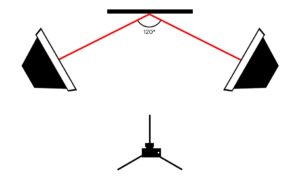
Place lights on both sides of the artwork for even coverage. Angle the lights at about 60 degrees away from the artwork to minimize reflections.
Technique
Stability and Focus:
Use a tripod for stability and consistency. Tap and hold on the smartphone screen to ensure the artwork is in focus.
Take Multiple Shots:
Capture several images with slight adjustments each time to ensure the best result. Refocus the lens for each shot to maximize sharpness.
Post Processing
Editing Software:
Use professional editing software like Adobe Photoshop or Lightroom for advanced adjustments. Smartphone apps like Snapseed can also provide basic editing options.
Cropping and Adjustments:
Crop the image to remove any background distractions and focus solely on the artwork. Adjust contrast, brightness, and color to match the original artwork as closely as possible.